Before our in-situ experience, where we will have the opportunity to create stop-motion videos with Grade 5 students as a class, we first practiced using this technology in small groups. We used the Stop Motion Studio app to become more comfortable and confident with this type of technology before teaching it to students.
What is Stop-Motion Animation?
Similar to a flipbook, stop-motion animation creates the illusion of movement through a sequence of images. It involves photographing objects and then physically moving and manipulating them within the frame. Each frame is played in a specific sequence, creating the illusion that the objects are moving on their own. This “illusion” can be used to create or tell a story. One of my favourite spooky movies growing up was Coraline, which was created using stop-motion animation. This film was the first stop-motion feature to incorporate 3D rapid-prototyping technology, combining 3D-printed elements with traditional stop-motion techniques. This means features of the characters were designed by a computer rather than being sculpted by hand.
Below is a YouTube video explaining how to create a stop-motion film using 3D images:
Why Are Stop-Motion Videos an Effective Classroom Tool?
I think stop-motion is a great way to incorporate technology into the classroom because it teaches students how to use technology and use it to support their learning. I also think it is a great way for students to think creatively about how to make their stop-motion videos, what materials to use and what type of story they would like to tell. We did ours in groups of three or four, so creating these videos is also a great way to encourage students to collaborate.
I think stop-motion can be used to present learning across a variety of subjects in the BC curriculum. This activity also strongly connects to two of the Core Competencies:
How Will You Use This Learning In Your Future Teaching?
Our teacher gave us a planning sheet to use as a guide when we complete this activity with the Grade 5 students. As I looked through the sheet, I immediately thought, “This would be a great activity to connect to English Language Arts!”
Below is my worksheet I created based on the stop-motion video I made with my group:
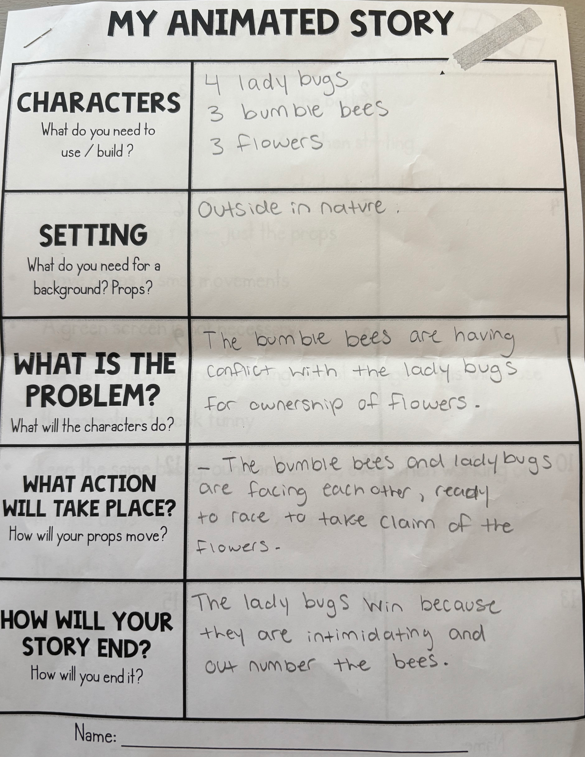
If students are completing a novel study, they could create a stop-motion video that depicts an important part of the story. They could share their video with the class and explain why they chose that scene and why it is significant to the story. I remember when my group and I finished our stop-motion video, we wanted to do a share-out so we could watch everyone’s videos and see what they had created. This would be a great summative assessment that shows students creativity and what they learned from the novel.
| Curricular Competency | Content Areas | Big Idea |
| Respond to text in personal and creative ways. | Oral language strategies. | Language and text can be a source of creativity and joy. |
| Story/text- Literary elements. | ||
| Story/text- Perspective/point of view. |
Reflection
I enjoyed doing this activity and getting to collaborate with my classmates. We were excited to choose from the materials that our professor provided and create a short story or event. My group and I were laughing and constantly generating new ideas to make our video more creative and engaging. We decided to add audio, including some of our own sound effects and voices, to make the video more silly and enjoyable. I had a great experience doing this activity and I cannot wait to share what I have learned and create stop-motion videos with the Grade 5 students next week!
Below is the stop-motion video my group and I created together!
Leave a Reply
You must be logged in to post a comment.